Customers
Customer Facing Rental Equipment Dashboard: What Your Customers Actually Need to See
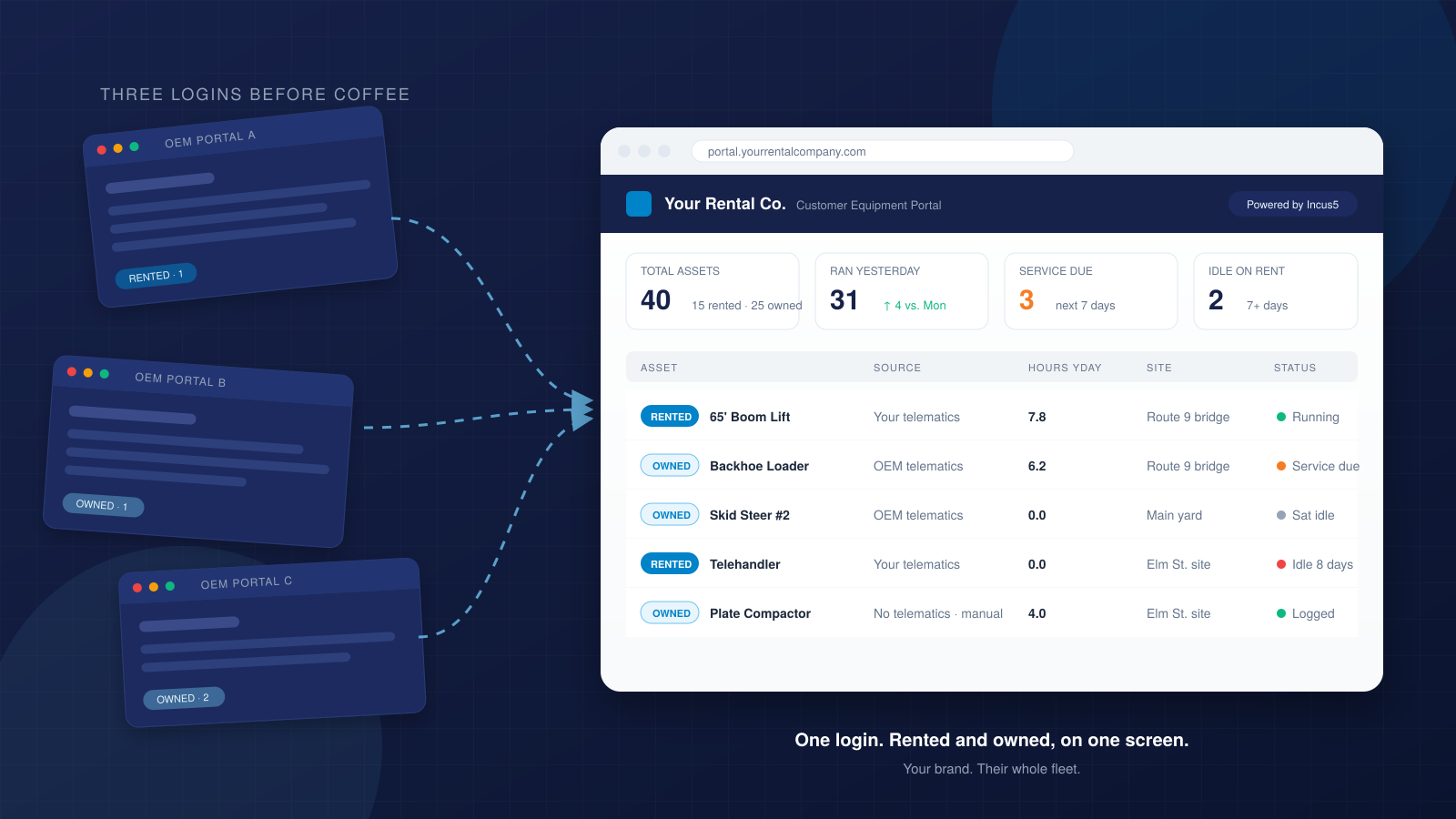
Your customer rents a Genie S-65 from you and owns a Deere 310L and two Bobcat skid steers. Right now they log into your rental portal to check hours on the Genie, then open JDLink for the Deere, then Bobcat's portal for the skid steers. Three logins before they know what ran yesterday.
You could give them one.
The dashboard your customer actually uses is the one you keep
A rental relationship is a series of transactions. The customer calls, you deliver, they pay, you pick up. Repeat until they find a better rate or a closer yard.
A platform relationship is different. The customer logs in every morning. They see what ran, what is due for service, where everything sits. The data becomes part of how they run their operation. That is harder to replace than a price match.
Most rental companies already have a customer portal. It shows the contract, maybe the invoice, sometimes the machine location. But it only shows what the customer rents from you. It says nothing about the Deere they own, the Bobcats they bought last year, the attachments with no telematics at all.
So the customer logs in somewhere else for those. And somewhere else becomes the system they check every morning.
What belongs in a customer portal (and what does not)
The question is not what you can show. The question is what makes your customer's morning easier.
| Data point | Why it matters to your customer | Where it comes from |
|---|---|---|
| Hours yesterday | Tells them what ran and what sat | Telematics (rented and owned) |
| Location | Which job site, not just a dot on a map | Telematics, contract, manual entry |
| Service due | So they schedule downtime before it is forced | Hour meter plus PM interval |
| Rental status | On rent, off rent, or sitting idle on a job | Contract dates plus telematics |
Notice what is not on that list. Invoicing lives in accounting. Contract terms live in the agreement. The portal is about the equipment, not the paperwork.
The retention math nobody talks about
When your customer logs into your dashboard every morning, two things happen.
First, they stop shopping. A customer who checks your portal before coffee is not browsing competitor rates. You are part of their routine, not a line item up for bid.
Second, they call you first when something goes wrong. The telehandler threw a fault code. The skid steer is due for service. They are already in your system, looking at the data. The phone call is shorter and the answer is faster.
On a contractor running 40 pieces of equipment (15 rented from you, 25 owned), your portal could be the only one they open. You become the platform for their whole operation, not just the vendor on 15 units. That is a different relationship.
What solving this looks like
Start with the data the customer is already entitled to. The telematics on the equipment you rent them, the telematics on the equipment they own (which they can share with you), the contract data in your ERP. Unify it into one view, branded as yours, accessible to their team.
The hard part is not the dashboard. The hard part is reading data from machines that came from different manufacturers, different telematics providers, and sometimes no telematics at all. An attachment with nothing on board still belongs in the picture. A fuel truck delivery still belongs in the picture. If you wait for every machine to report, you never have the full view.
Incus5 connects to 51+ telematics and ERP systems and gives rental companies a white-label customer portal. Your customers see what they rent from you and what they own, on one screen, with your branding. On a 200-asset customer running 50 pieces of your equipment, that is 200 assets they check through you.
Key takeaways
- A customer portal that only shows rented equipment is half a solution; your customer still logs in elsewhere for what they own.
- The dashboard your customer checks every morning is the relationship they keep; make it yours.
- Combining rented and owned equipment in one view turns a transaction into a platform, which is harder to replace than a price.
- The data to do this already exists: telematics from multiple sources, ERP records, even assets with no tracking at all.
Frequently asked questions
What is a customer facing rental equipment dashboard?
A customer facing rental equipment dashboard is a portal where your rental customers can see the equipment they rent from you alongside the equipment they own. It pulls telematics data from multiple sources (OEM systems, aftermarket trackers, your ERP) into one view, so your customer logs into one place instead of several.
Why would a rental company offer a dashboard that shows equipment they do not own?
Because the dashboard is a retention tool, not a product feature. When your customer checks your portal every morning for their whole fleet (rented and owned), you become part of their operation. That relationship is harder to replace than a competitive rental rate. The data they need is the data you deliver.
How does a customer portal handle equipment with no telematics?
Assets without telematics can still appear in the portal. Contract data, fuel delivery records, and manual hour entries fill the gap. The goal is one view of everything the customer operates, not just the machines that send signals. Waiting for perfect data means never having the full picture.
What data sources feed a customer facing equipment dashboard?
OEM telematics (Cat Product Link, JDLink, Genie, JLG), aftermarket trackers (Samsara, Geotab, Trackunit), ERP systems (Point of Rental, RentalMan), and operational records like fuel deliveries. The platform reads from 51+ sources, unifying them so your customer sees one screen regardless of what brand or system each machine uses.